For videographers and second shooters
Your rates. Your calendar. Offers that fit.
If you film for a wedding studio that uses CamCrewz, this is how it works on your side. You set your rates and the days you can't work once. Offers come to you priced from them. You see exactly what a job pays before you say yes, and you sign from your phone.
It's free for videographers, and there's nothing to install.
Getting started takes a few minutes
-
Get the invite
A studio you work with invites you by email. There's no public sign-up: you're only ever on the rosters of studios that asked for you.
-
Make a login
Open the link, add your name and choose a password. If you already have a CamCrewz login from another studio, sign in with it.
-
Fill in your profile
One page, saved a section at a time, so you can do it from your phone in a spare ten minutes.
-
Get approved
The studio reviews your profile and approves you. You'll get an email saying what's left before offers reach you.
What goes in your profile
Everything that decides which jobs reach you and what they pay, in one place you control.
- Your rates
- An hourly rate, a day rate for travel days, whether you charge mileage, and a project minimum if you have one.
- How far you'll go
- A travel radius in miles, or no limit. Jobs farther than that don't come to you as direct offers.
- What you do
- The roles you take (solo, lead, second, assistant), photo or video, your skills, your shooting style and the ceremonies you've filmed.
- Your gear
- Cameras, lenses, audio, lighting, stabilizers and drones.
- Days you can't work
- Block them out and you won't get offers for them.
- Paperwork
- Whatever the studio asks for, like a W-9, an insurance certificate or a Part 107 certificate. Uploads are encrypted.
- How you hear about things
- Email or text, chosen for each kind of update. Texts only ever go out if you tick the box.
Your home address is used to work out your travel. It's never shown to other videographers.
How your price is worked out
Every job has a budget from the studio. Your price is your own cost for the job, or that budget, whichever is lower:
the job's hours × your hourly rate
+ your travel from your home
Travel is priced by how far you drive: nothing extra close to home; a hotel night, meals and a travel day at your own travel day rate for a longer drive; flights beyond that. Mileage is included only if you charge it.
Example. Eight hours as a second shooter at $75 an hour is $600. If the venue is a long way from home, add a hotel night, two meals and a travel day at your rate. If the venue is 20 minutes away, your price is the $600.
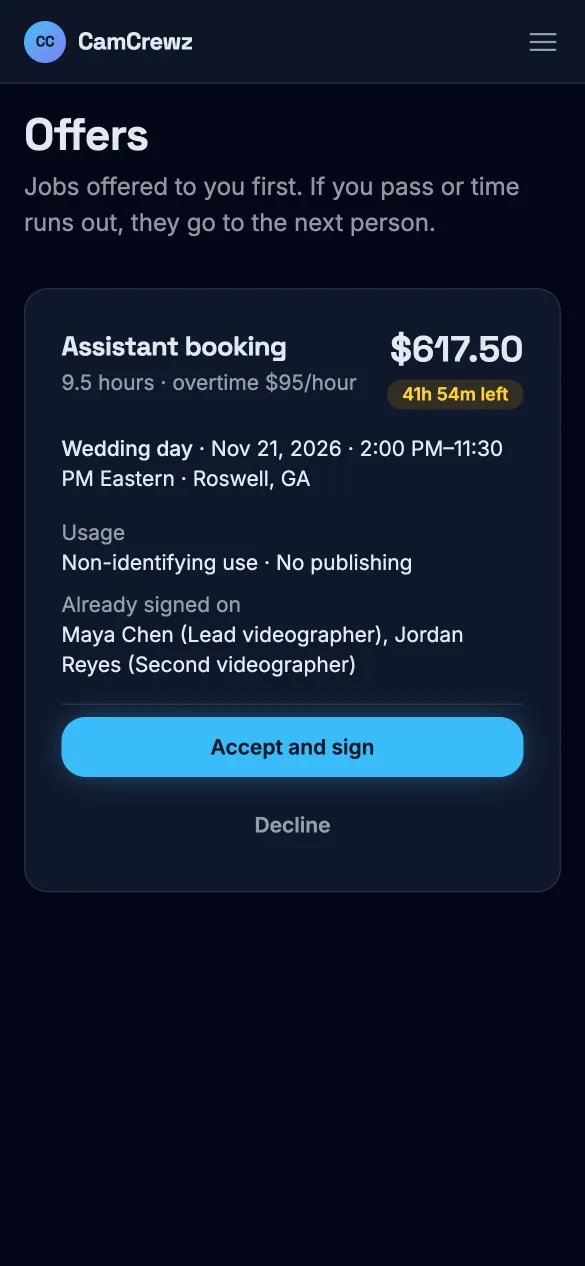
You see your price on the offer before you decide, and it doesn't change after: it's locked when the offer is sent to you, or when you start signing for a job on the board. You never see other people's prices, and they never see yours.
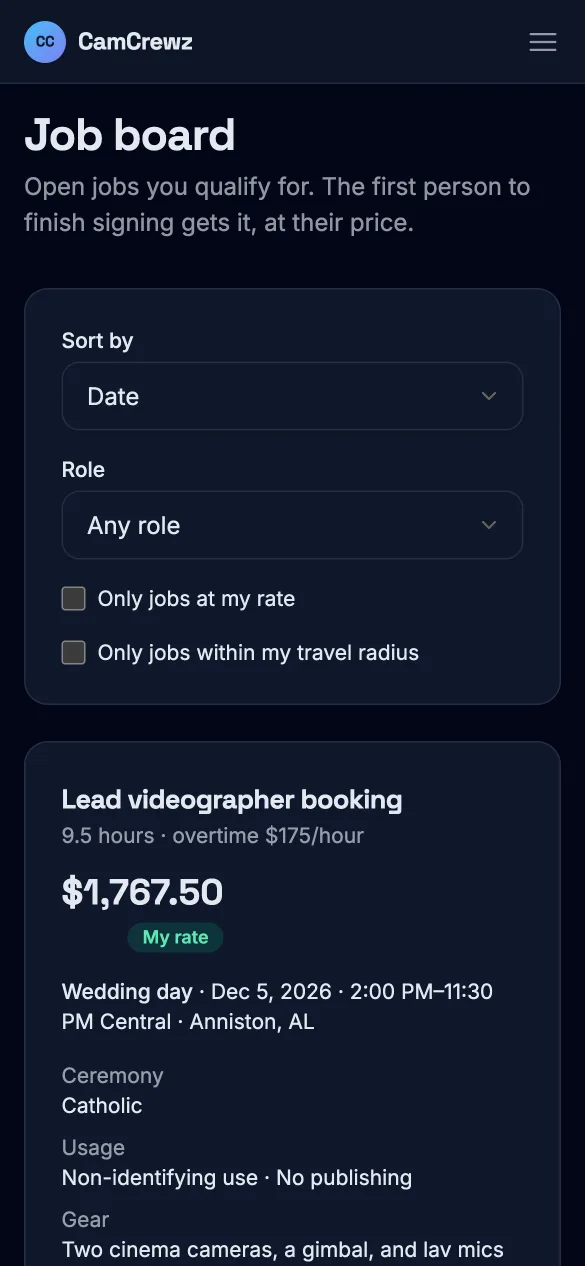
If your price would be over the budget, the job won't come to you as a direct offer. If it reaches the job board, you'll see it marked as under your rate, and it's your call.
When a job comes in
An offer, just for you
You get an email or a text. The offer shows the role, dates, hours, the city, your price, the overtime rate, any gear the job needs, what you may post from it, and how long you have to answer: usually 24 hours, with a reminder two hours before it runs out. Accept and sign in one step, or decline and it goes to the next person.
The job board
Jobs nobody on the studio's list took open on the job board, where you only see the ones you qualify for. Filter to jobs at your rate or within your travel radius. The first person to finish signing gets it, even if they passed on it earlier.
Holds
A hold keeps your dates for a wedding that hasn't booked yet. You can drop it any time before it's booked, unless it's to take another job on those dates: then tell the studio, and they have 48 hours to book you or let you go. If they book it on the same or better terms, it's yours.
Contracts you can actually read
You sign the studio's Master Agreement once. After that, each job has its own short agreement with that job's dates, hours, price, overtime rate and posting rules already filled in. Sign by typing your name or drawing your signature with your finger.
The studio countersigns within 14 days. If they don't, the job lapses and you're free. Every contract you sign stays in your account as a PDF.
Once you're booked
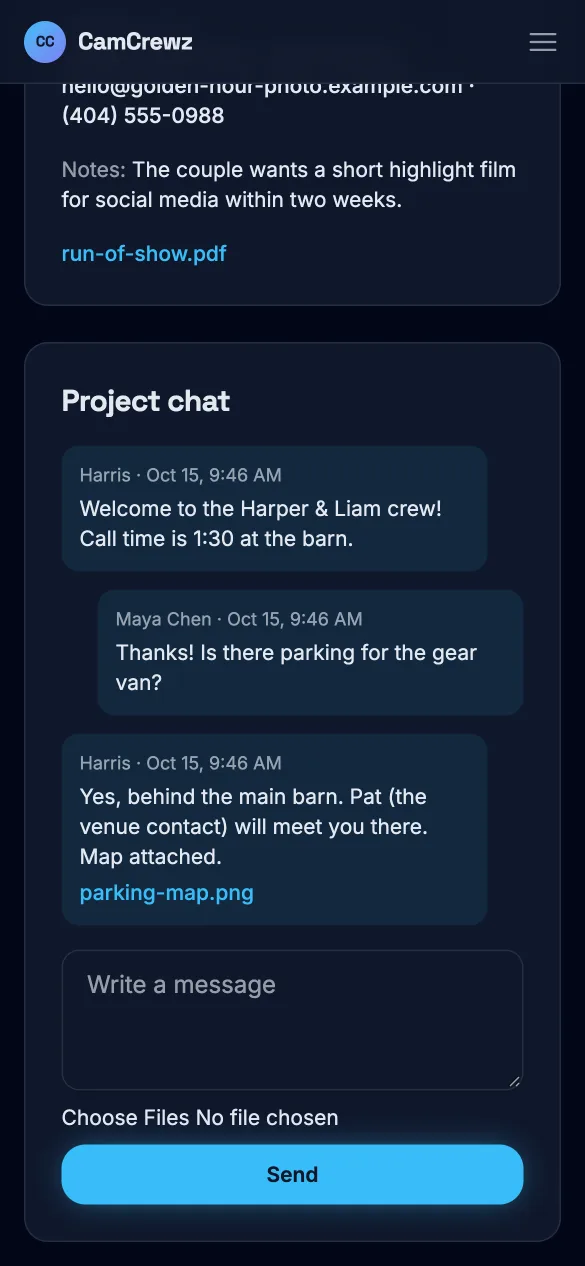
After the studio countersigns, you get the full brief: the timeline, the shot list, addresses, contacts and notes, plus a chat with the studio and the rest of the crew.
If the job changes, you're told. Added hours are paid at the overtime rate. A move to a venue farther away adds the travel. A dropped event comes off. Your booking always shows what you're owed, change by change. The studio pays you, as it does now: CamCrewz doesn't handle payments.
Questions from videographers
Can I sign up without an invite?
No. Studios invite the videographers they work with. If a studio you shoot for uses CamCrewz, ask them for an invite.
Do I need to install an app?
No. CamCrewz works in the browser on any phone, tablet or computer.
Does it cost me anything?
No. Studios pay for CamCrewz. Videographers never do.
Can I turn down an offer?
Yes. Decline it and it goes to the next person. If nobody takes it, it opens on the job board, and you can still take it there.
How do I get paid?
By your studio, the way you're paid now. CamCrewz doesn't handle payments, but it keeps a running record of what each booking owes you, including added hours and travel changes.
Can I change my rates?
Any time, on your profile. New rates apply to offers you haven't been sent yet. A price already offered to you stays as it was.
Who sees my information?
The studio sees your profile. Other videographers never see your home address, your documents or your prices. Documents and signatures are stored encrypted, and a studio never sees your work for another studio.
Got an invite?
Open the link in your invite email to make your login. Already have one? Sign in. If a studio you film for isn't on CamCrewz yet, send them the page for studios.
Sign in